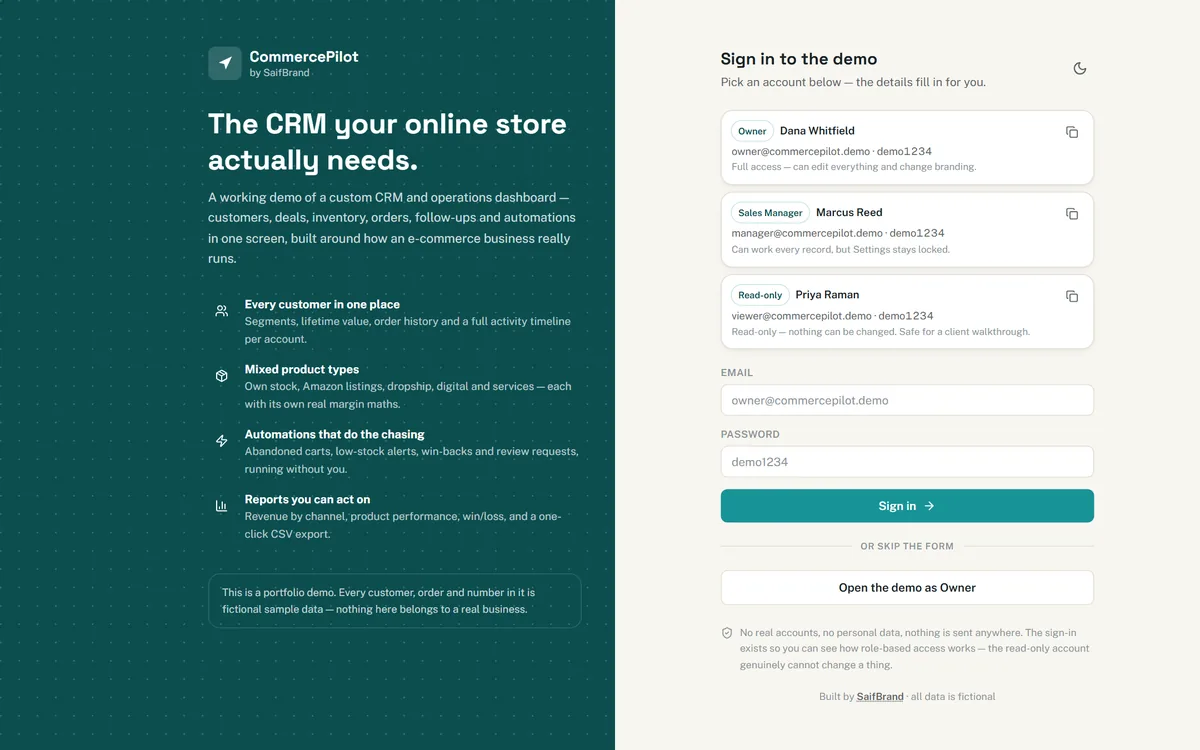
Owner — full access
owner@commercepilot.demo
demo1234
Can edit every record, move deals, change stock and re-brand the whole interface.
Customers, deals, inventory, orders, follow-ups and automations on one screen — a fully working demo you can log into and click through right now.
Every customer, order and figure in the demo is fictional sample data.
Three demo accounts with different permission levels. Nothing you do affects anything real — and a “Reset demo” button in the top bar puts everything back.
owner@commercepilot.demo
demo1234
Can edit every record, move deals, change stock and re-brand the whole interface.
manager@commercepilot.demo
demo1234
Works every customer, deal and order — but Settings stays locked.
viewer@commercepilot.demo
demo1234
Can see everything, change nothing. The permission rules are enforced in the app, not just hidden buttons.
In a hurry? The sign-in screen also has a one-click “Open the demo as Owner” button. Works on desktop, tablet and phone.
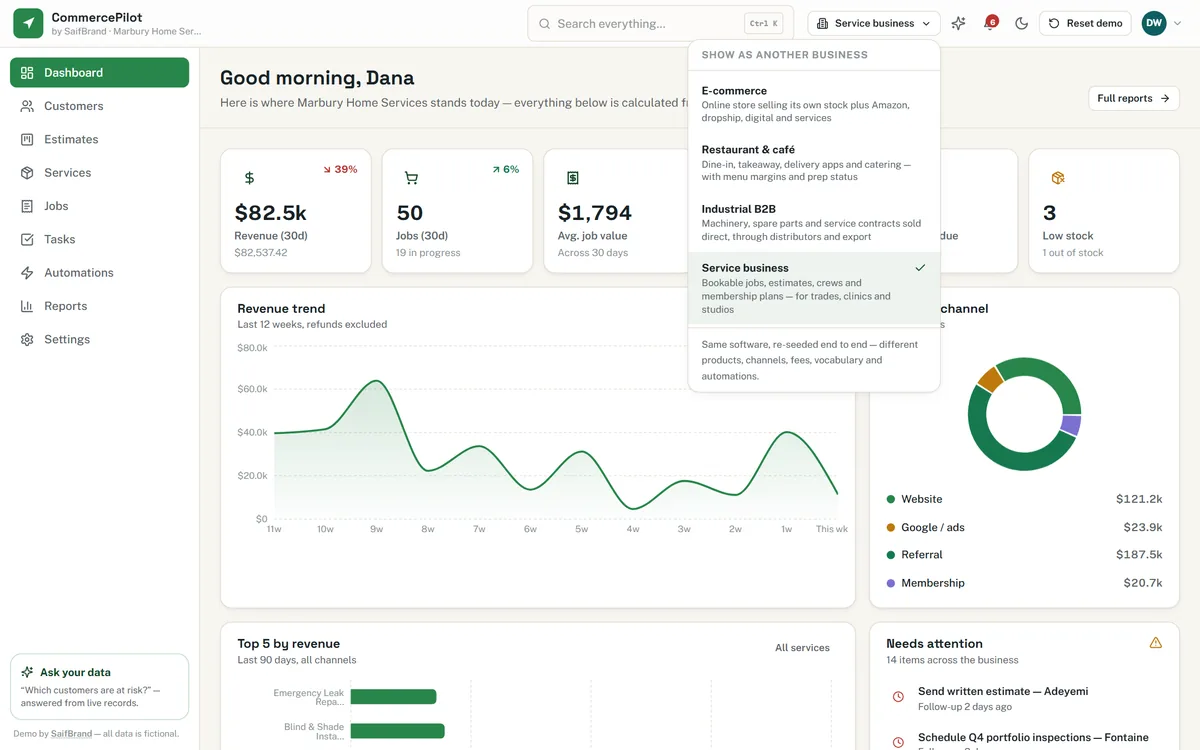
A shop, a café, a factory and a service company do not work the same way — so they should not be handed the same software with the words swapped. Use the business-type switcher in the demo's top bar and the whole thing reloads: different products, different channels, different fees, different vocabulary, different automations.
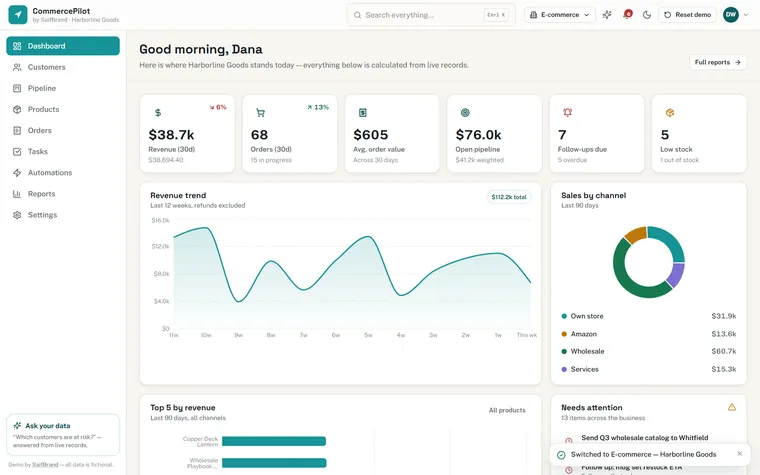
Online store. Own stock, Amazon listings with referral and FBA fees, dropship, digital and services. Orders run New → Packed → Shipped → Delivered.
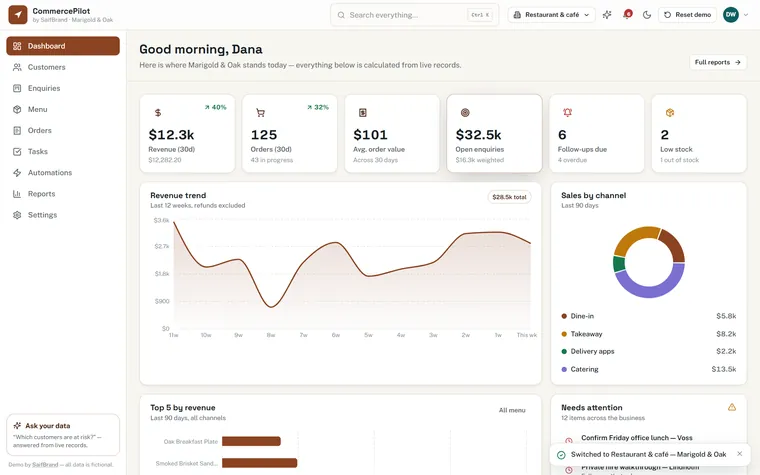
Café & restaurant. A Menu instead of Products, tickets running New → Preparing → Ready, dine-in vs takeaway vs delivery apps — with the 30% delivery commission taken off the margin where it belongs.
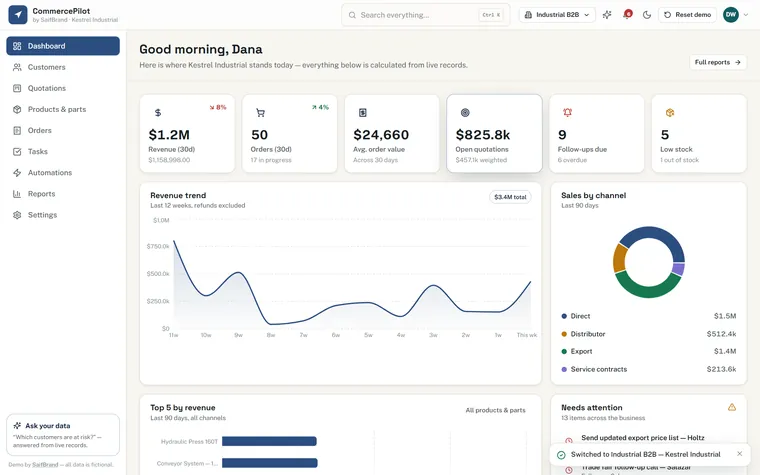
Industrial B2B. Quotations instead of deals, machinery, spare parts, consumables and a distributor line, orders moving through Confirmed → In production → Shipped.
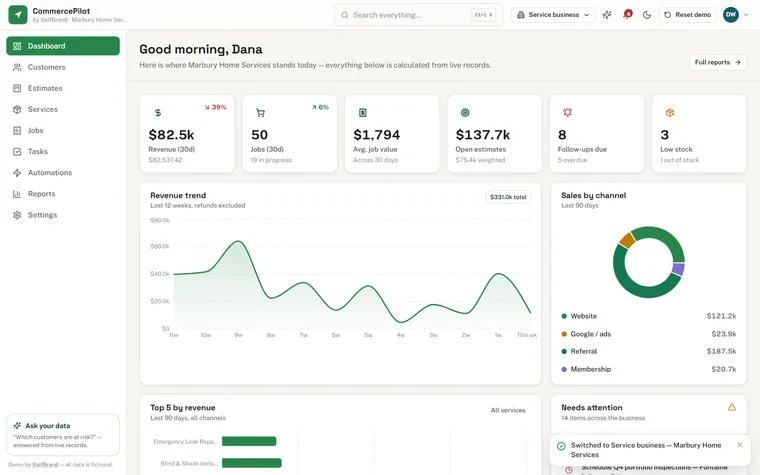
Service business. Jobs and Estimates, call-outs, installations, van stock, membership plans and subcontracted work with the partner's share deducted.
Four is what the demo ships with, to prove the point. A real build is written for one business — your product types, your channels, your fee structure, your words. Nothing generic left in it.
Orders in the store admin. Customers in a spreadsheet. Amazon fees in a second spreadsheet. Follow-ups in WhatsApp. Stock counts in someone's head. Nothing talks to anything else, so nobody actually knows which products make money or which good customer has quietly stopped buying.
Every customer, order, product, deal and follow-up in one place — and everything cross-linked, so one click takes you from an order to the customer to their whole history.
Own stock, Amazon (referral + FBA fees), dropship (supplier cost and lead time), digital and services each calculate margin their own way — because they genuinely are different.
Abandoned carts chased, low stock flagged, quiet customers tagged, review requests sent — the automation layer is where the real hours come back.
Nothing below is a mockup — these are screenshots of the running demo. Every number is calculated from the underlying records, so editing an order visibly moves the KPIs on the dashboard.
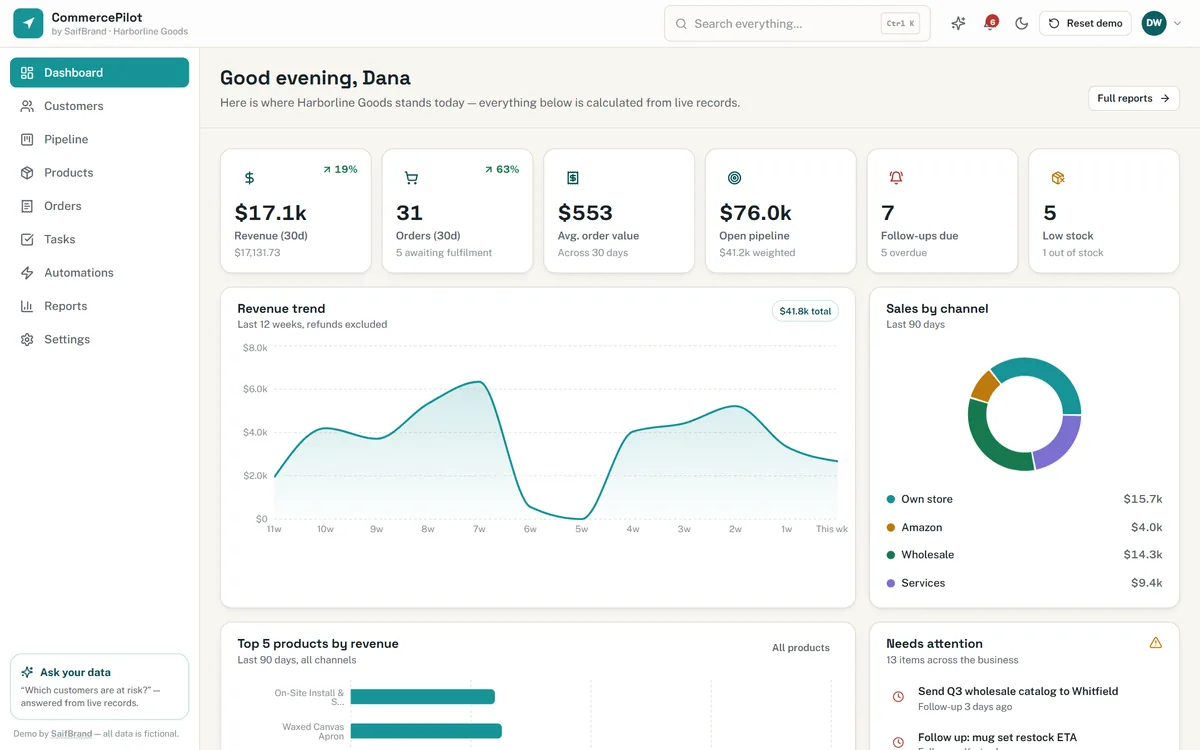
Dashboard. Revenue, orders, average order value, open pipeline, follow-ups due and low stock — plus a “Needs attention” panel that pulls overdue tasks, stock-outs, unshipped orders and at-risk customers into one actionable list.
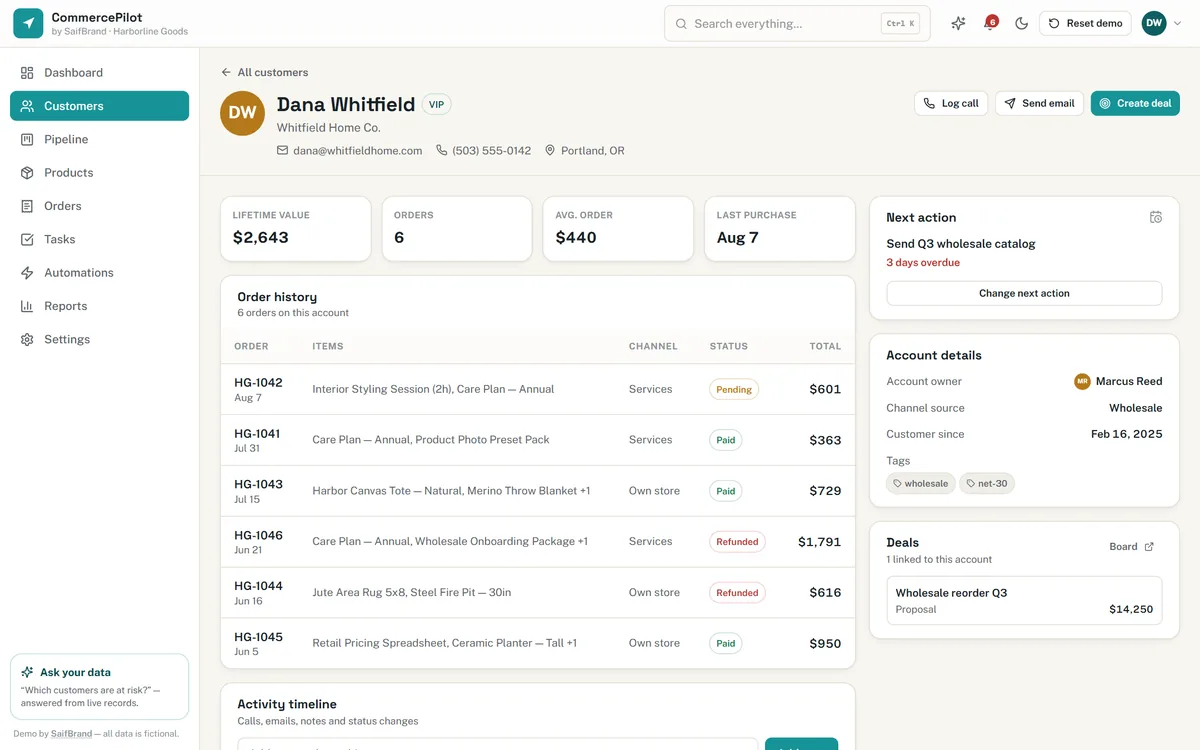
Customer profile. Lifetime value, order count, full order history, an activity timeline of calls, emails and notes, the next action with its due date, and one-click log-a-call / send-email / create-deal buttons.
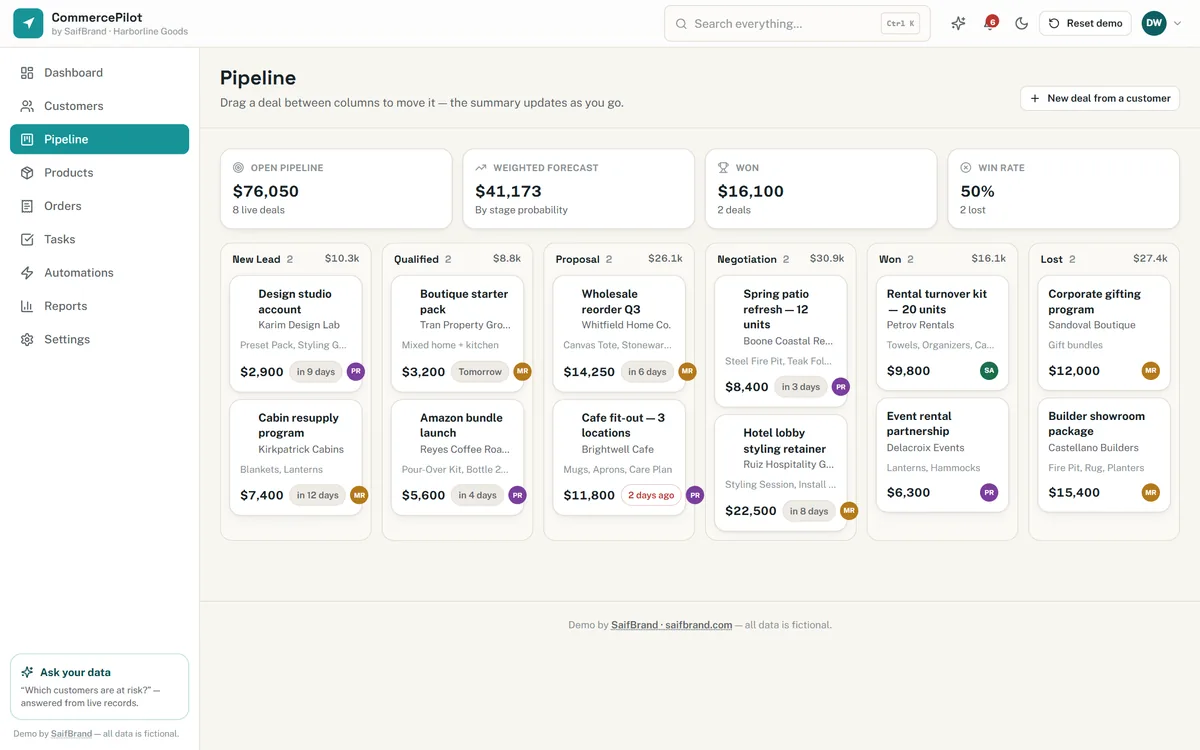
Pipeline. Drag a deal between stages and the column totals, weighted forecast and win rate all recalculate. Marking a deal lost asks why — which is what makes the win/loss report worth reading later.
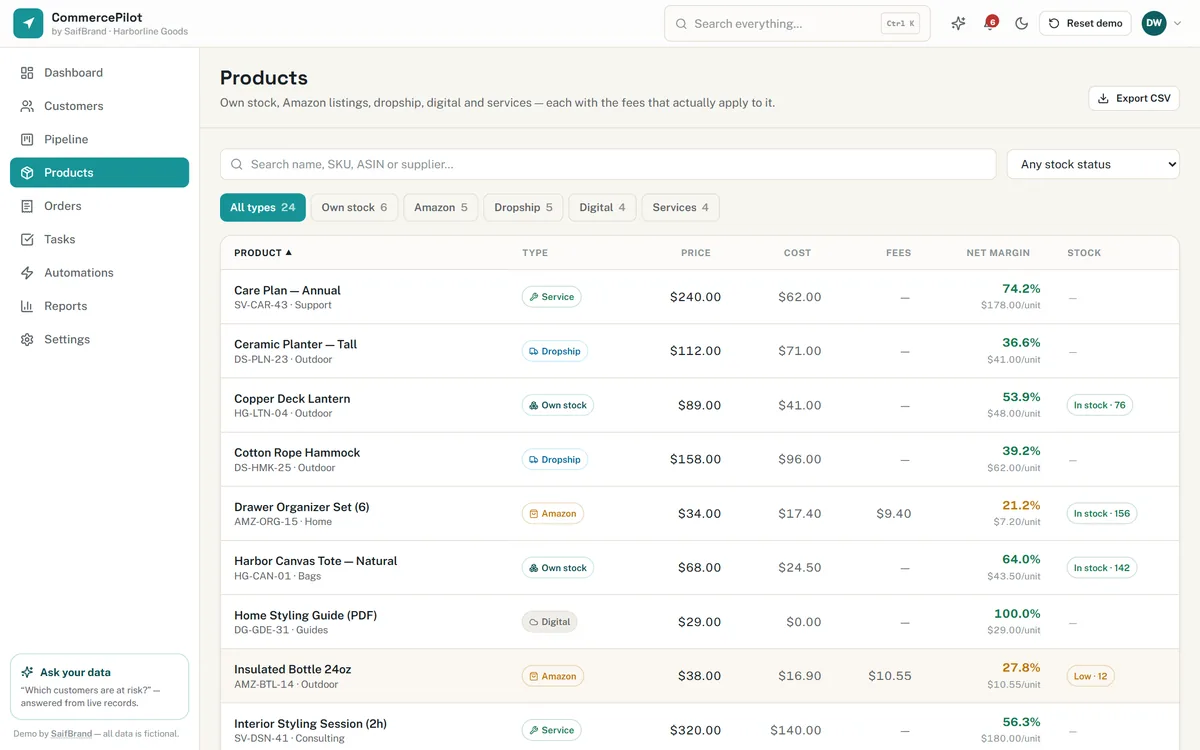
Products. Five product types side by side, with net margin computed live and colour-coded — green above 30%, amber 15–30%, red below. Open any row for the full cost → fees → margin breakdown and an 8-week sales sparkline.
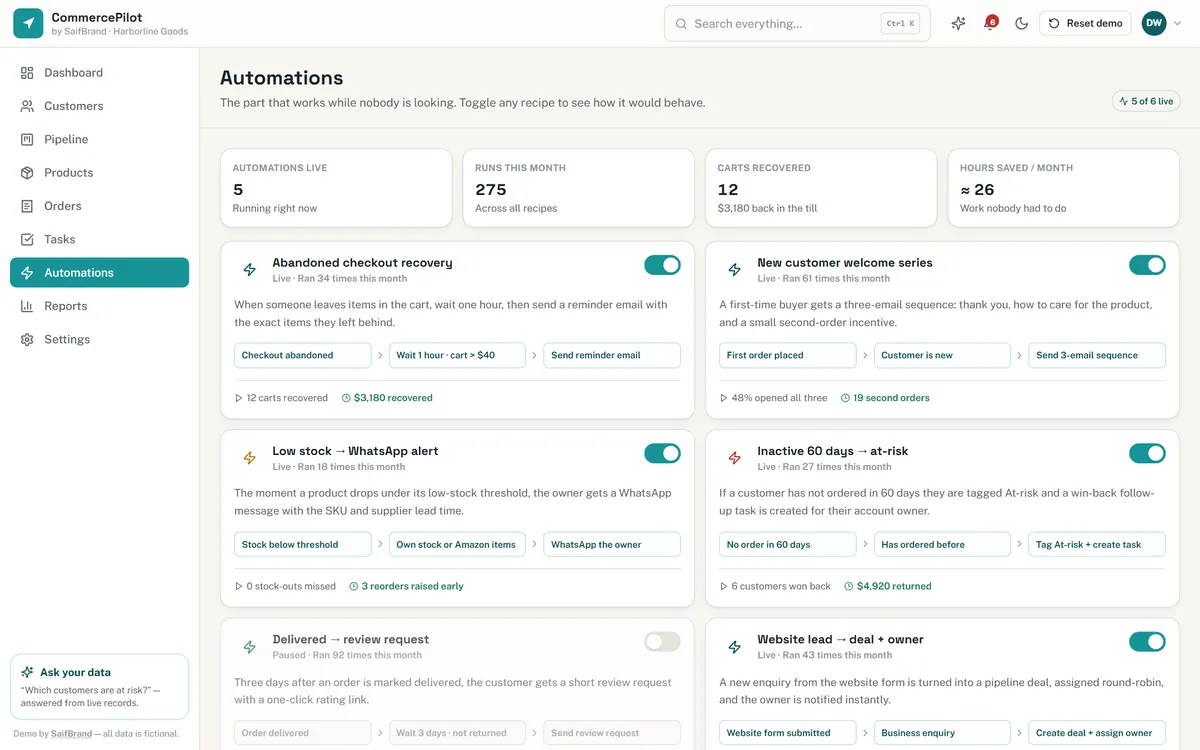
Automations. Six recipes, each shown as a plain-English trigger → condition → action flow with its own run statistics. This is the page that explains where the time saving actually comes from.
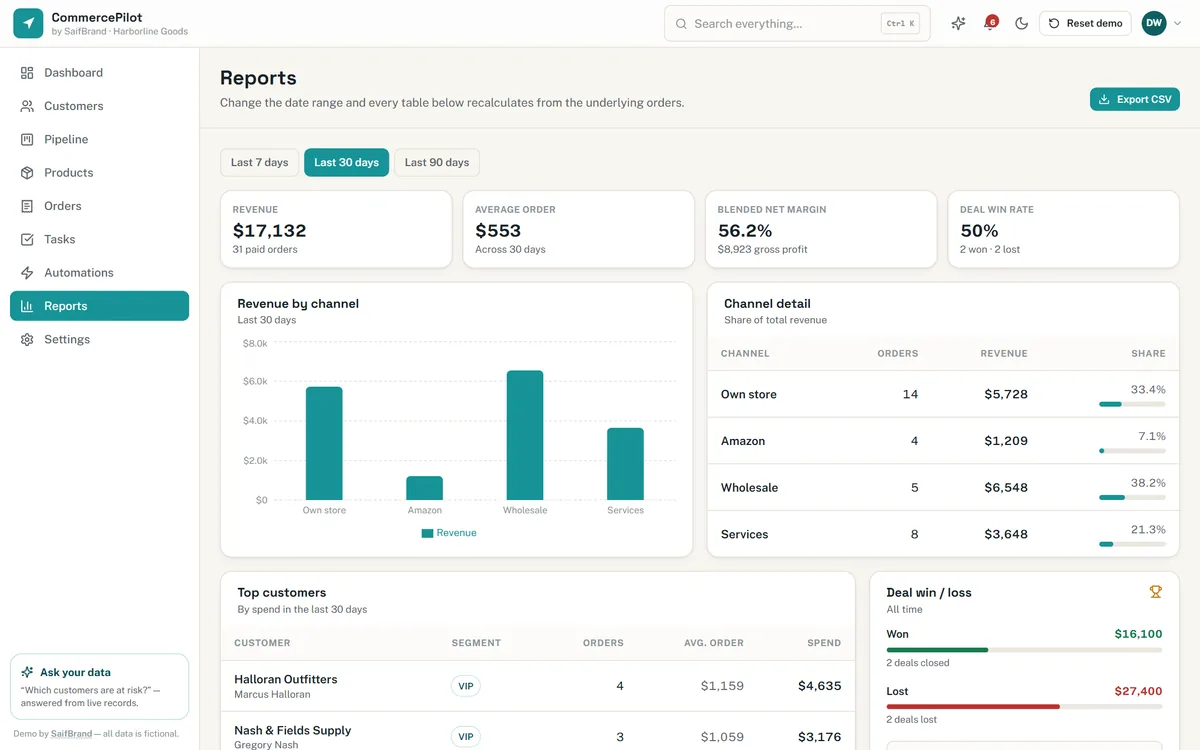
Reports. A 7/30/90-day switch that genuinely re-filters the data, revenue by channel, top customers, product performance with margins, win/loss with reasons — and a one-click CSV export that downloads a real file.
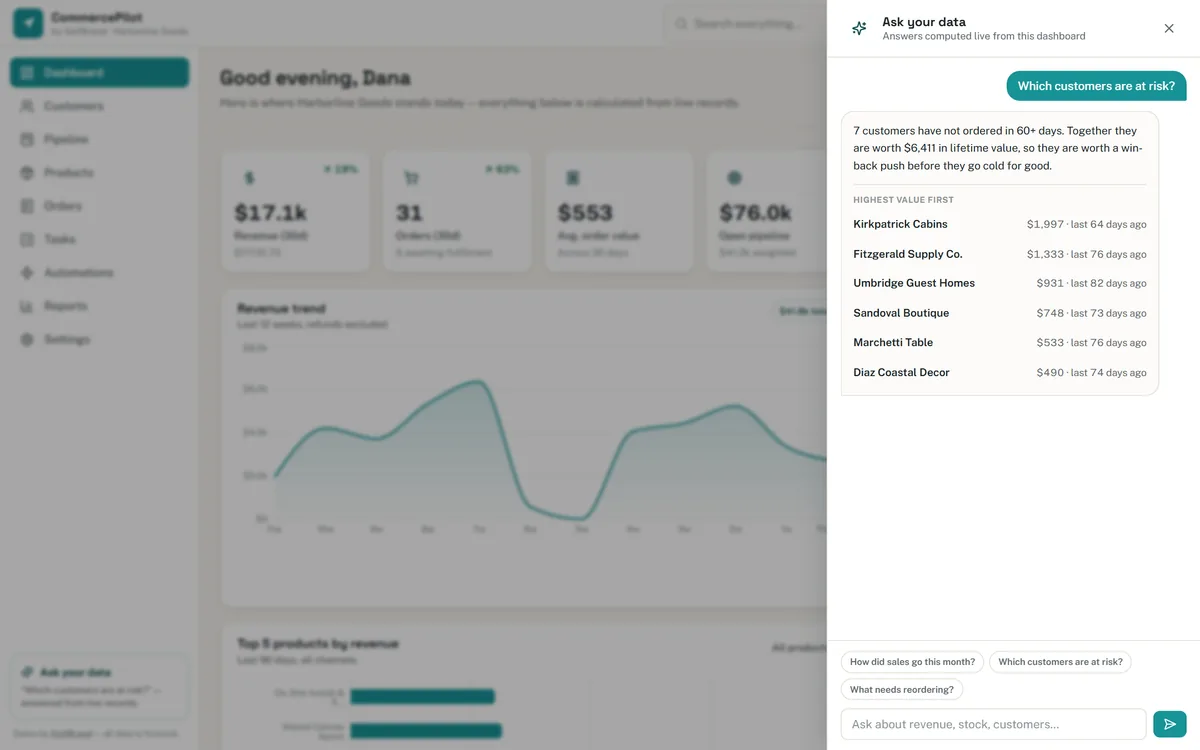
Ask your data. Type a question in plain English — “which customers are at risk?”, “what needs reordering?” — and get an answer computed from the same live records, with links straight to the accounts involved. It runs inside the dashboard, so there is no per-question cost and no data leaves the browser.
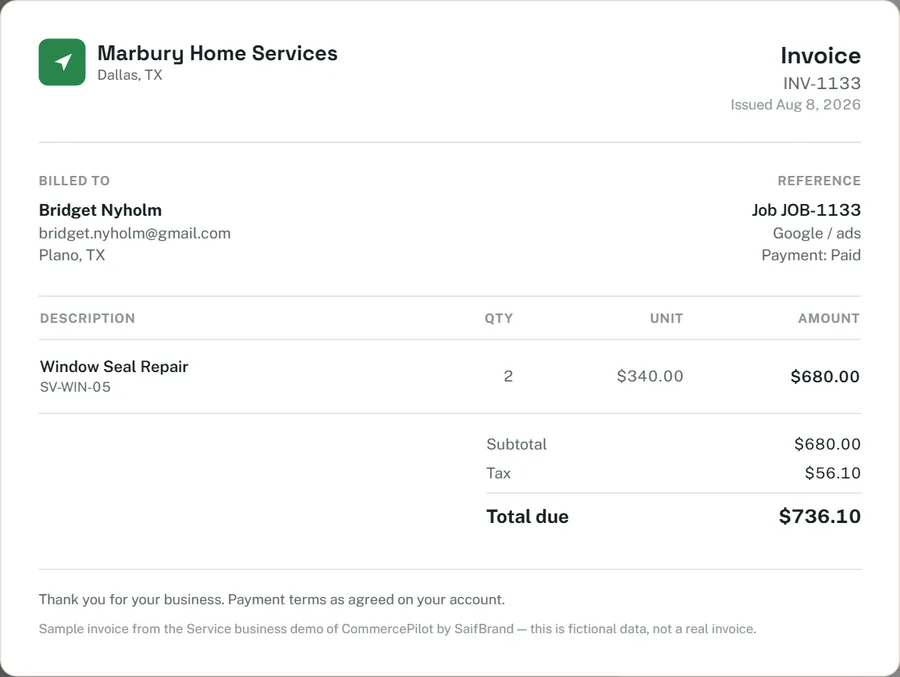
Invoices. Any order turns into a clean, branded invoice in one click — carrying the business name and colours set in Settings — and prints or saves to PDF straight from the browser.
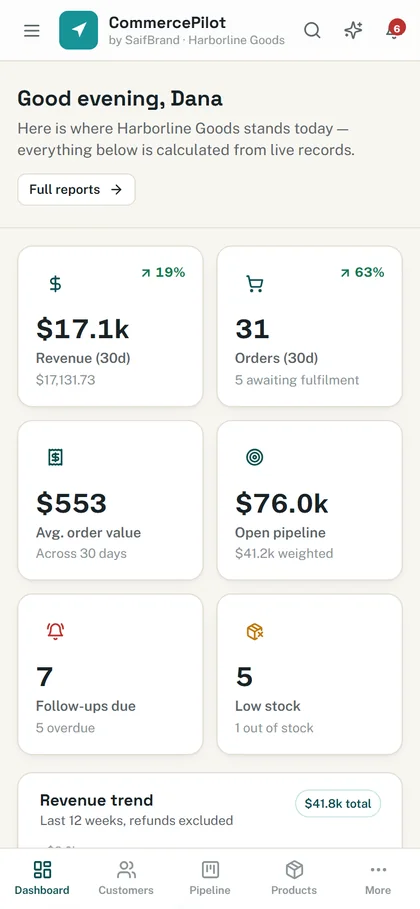
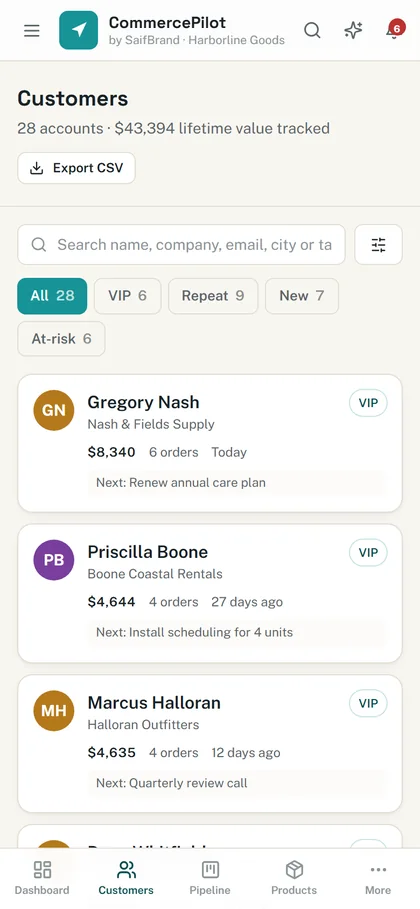
On the phone. Not a squeezed desktop layout — the tables become cards and the sidebar becomes a bottom nav bar, so it is genuinely usable while you are standing in the stockroom.
Six live KPIs, a 12-week revenue trend, channel split, top products, and a needs-attention feed that surfaces problems before customers notice them.
Segments (VIP / repeat / new / at-risk), lifetime value, source and tag filters, activity timelines, notes and next actions.
Drag-and-drop deal board, weighted forecast, stage history, and lost-reason capture that feeds the win/loss report.
Own stock, Amazon, dropship, digital and service lines — each with the fees, stock rules and margin maths that actually apply to it.
Payment and fulfilment status, line-item detail, status timelines, advance-to-next-stage and refund actions that write back to the customer record.
Overdue / today / this week grouping, linked to the customer or deal they belong to, with quick-add and automatic creation from the automation rules.
Cart recovery, welcome sequences, WhatsApp stock alerts, at-risk tagging, review requests and lead-to-deal routing — each one switchable on or off.
Real date-range filtering, channel and product performance, top customers, win/loss, and exports that open straight in Excel or Sheets.
Your business name and accent colour re-theme the entire interface live, and three permission levels control who can change what.
Any order becomes a branded, print-ready invoice — no separate invoicing tool, no retyping, saves to PDF from the browser.
Retail, hospitality, industrial and service versions are all in the demo — each with its own products, channels, fees and wording.
Extras worth clicking in the demo: global search on Ctrl + K, a light and dark theme, keyboard-accessible everywhere, and a layout that holds together down to a 375px phone screen.
This version is deliberately self-contained so anyone can open it without a login or a setup call. A real build connects to the systems you already use.
WooCommerce, Shopify or a custom cart — orders, customers and stock sync in automatically, both ways.
Amazon and other channels pulled in with their real fee structure, so channel margins stop being a guess.
Sequences, alerts and approvals go out through the tools your team already lives in.
Two-way syncs and scheduled exports so nobody retypes anything into a spreadsheet again.
Tell me what your day currently looks like — which tabs you keep open, what gets forgotten, what you wish you could see at a glance. I will scope a dashboard around that, not around a template.